# Add Wallets
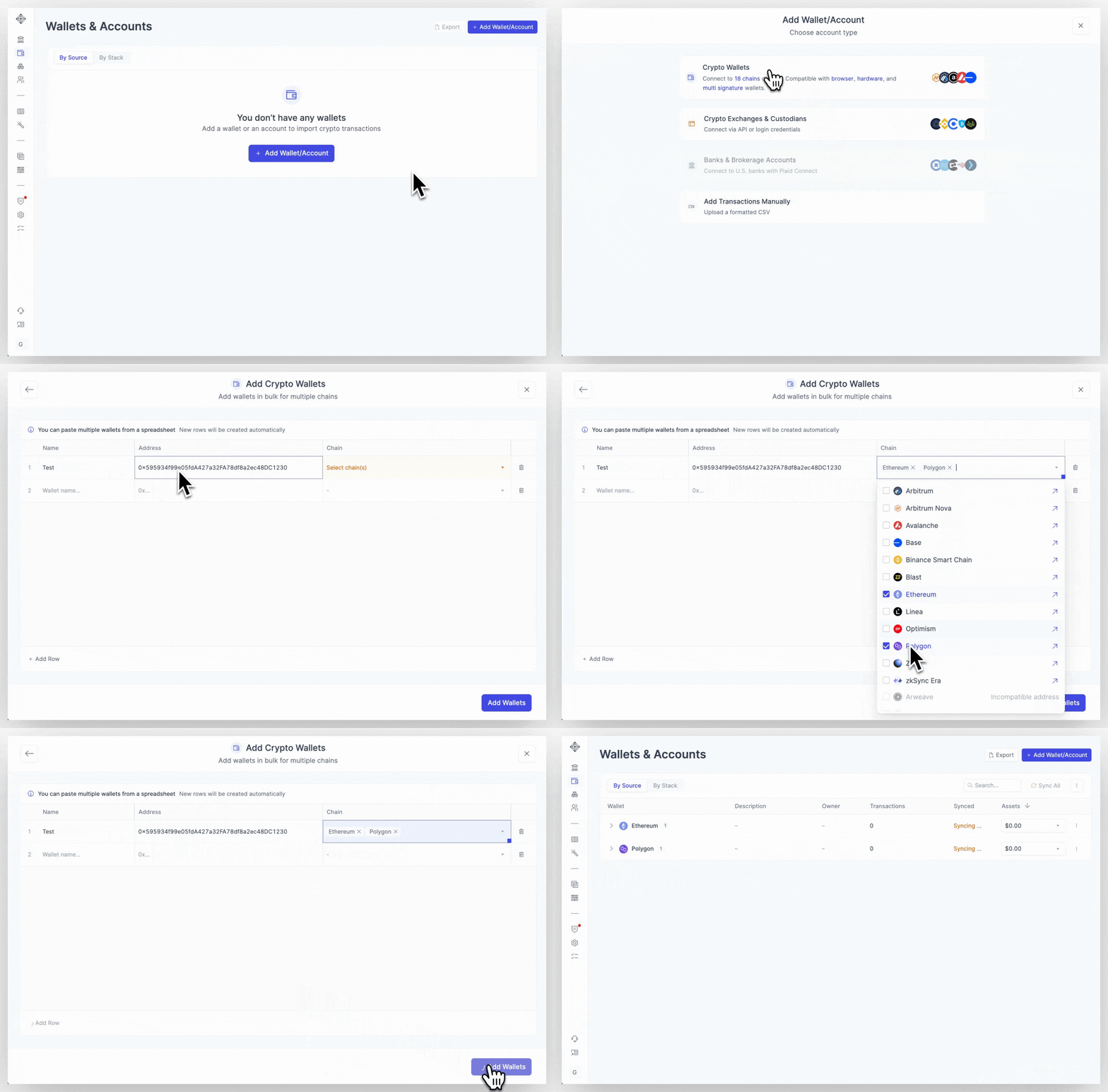
Follow the steps in our [Getting Started module](https://app.integraltreasury.xyz/setup), or add your crypto accounts from the [Wallets page](https://app.integraltreasury.xyz/wallets) by clicking on "Add Wallet" in the top right corner. Select the account type you want to add, and follow the on-page instructions.
{% hint style="info" %}
For detailed instructions on adding a specific chain or account type, see [Add Wallets & Accounts](https://integral-treasury.gitbook.io/integral-treasury/how-to-guides/add-wallets-and-accounts) under the How-To Guides section.
{% endhint %}
## Add Wallet/Account
**What you'll need:** Your crypto wallet address and a name for the wallet. That's it!
**How to add a crypto wallet:**
1. Click on Add Wallet/Account
2. Select Crypto Wallets
3. Give your wallet a name, paste in your wallet address, and select the chains that it operates on (In most cases, Integral will automatically recognize the source network)
4. Click on Add Wallets in the bottom right-hand corner
Integral will begin the syncing process, and after a few minutes you will be able to see your wallets data under the Treasury and Bookkeeping page.
## Add Multiple Wallets
In many cases, organizations will have dozens, sometimes hundreds of crypto wallets. Integral has made it easy for users to import multiple wallets with our Bulk Wallet importer.
**What you need:** A CSV list of wallet names and crypto wallet addresses.
**How to Bulk Add crypto wallets:**
1. Go to Add Wallet/Account
2. Click on Crypto Wallets
3. Go to your CSV list of names and addresses, and copy them
4. Go back to Integral and click inside the first cell in Column 1, Row 1
5. Paste all names and wallet addresses
6. Click on the Chain dropdown for each address and select the chains it operates on (you can select more than 1 as long as it's in the same ecosystem such as **Ethereum \[L1]** and **Polygon \[L2]**)
7. Once complete, click Add Wallets in the bottom right-hand corner.
Integral will automatically separate each name and address into it's own column/row, and add the source network automatically if available.
{% hint style="info" %}
For detailed information about our Bulk Wallet importer, visit [Add On-Chain Addresses](https://integral-treasury.gitbook.io/integral-treasury/how-to-guides/add-wallets-and-accounts/add-on-chain-addresses) in our How-To Guides.
{% endhint %}