# Step 2: Mark Transactions as Ready to Sync

Once your transactions have been categorized (see them in [Bookkeeping](https://app.integraltreasury.xyz/accounting?category=categorized\&page=1)), you will need to mark them as *Ready to Sync*. This will move the transactions to the *Ready to Sync* tab in Bookkeeping.&#x20;

{% hint style="info" %}
If you're using Bookkeeping V2, there is no *Ready to Sync* section. [See here](#marking-transactions-as-ready-in-bookkeeping-v2) for more info.
{% endhint %}

## **Option 1**

&#x20;**Individually select transactions to sync (Bookkeeping V1)**

Click on the checkmark (✔️) icon on the right of a transactions under **Categorized** to set it as “Ready to Sync”.

<figure><img src="https://3061199926-files.gitbook.io/~/files/v0/b/gitbook-x-prod.appspot.com/o/spaces%2Ft1fkaxq4yvhcAFiQKv7R%2Fuploads%2FZQW67e1GK4HPl6B21CMn%2FMonosnap%20Integral%202024-07-30%2014-36-02.png?alt=media&#x26;token=6ba14dec-1279-4d45-83f5-42bd73fe1850" alt=""><figcaption></figcaption></figure>

## **Option 2**

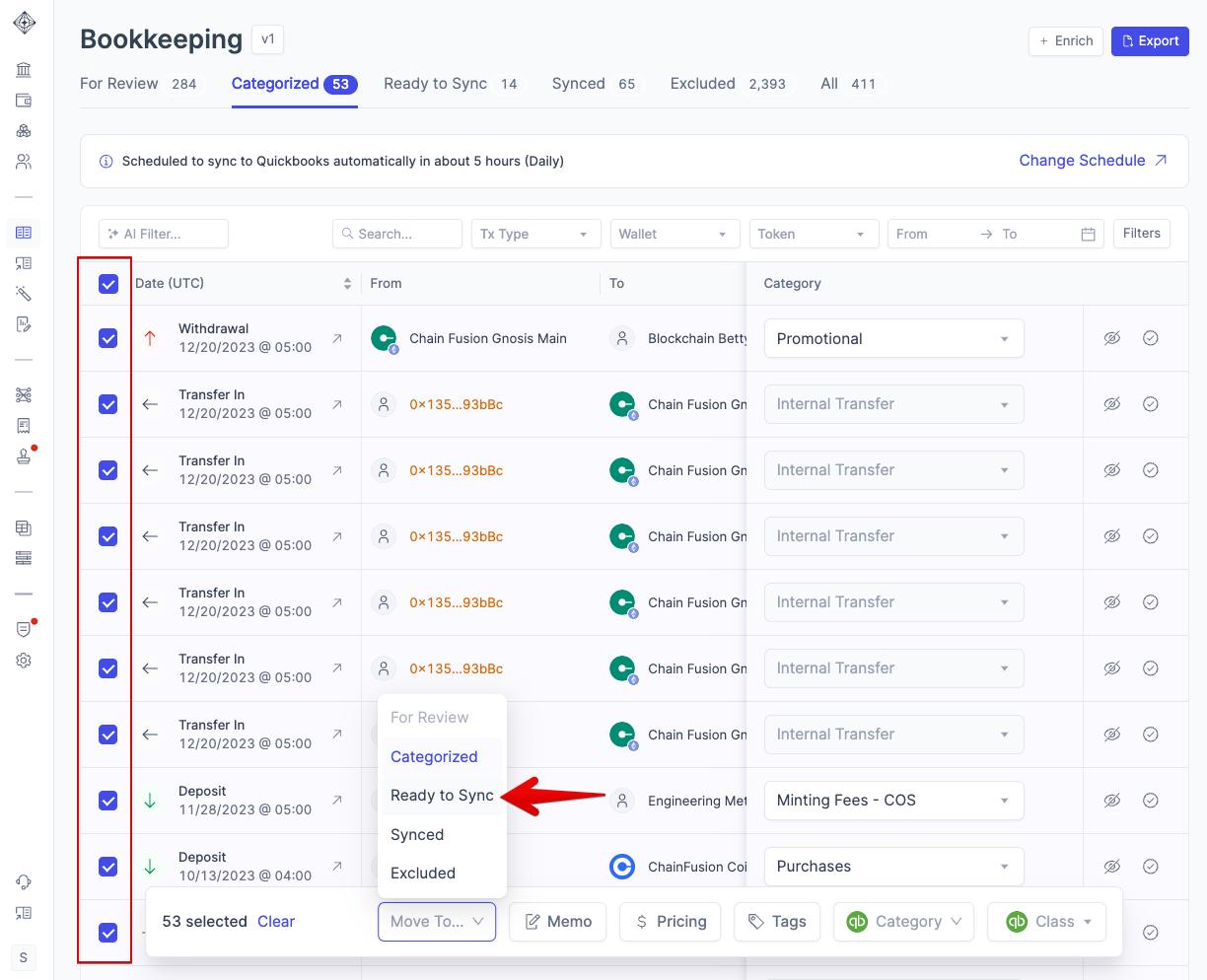
**Use Bulk Actions to mark as Ready to Sync (Bookkeeping V1)**

While on the **Categorized** tab, use the bulk-select boxes on the left of the transactions table to mark multiple transactions on a page as “Ready to Sync”. You will need to do this for each page.

<figure><img src="https://3061199926-files.gitbook.io/~/files/v0/b/gitbook-x-prod.appspot.com/o/spaces%2Ft1fkaxq4yvhcAFiQKv7R%2Fuploads%2FJpxEKnOrLtsMSZJSltmD%2FMonosnap%20Integral%202024-07-30%2014-43-09.png?alt=media&#x26;token=d072d1d1-d84b-4a4c-b275-0712a7a1f886" alt=""><figcaption></figcaption></figure>

## **Option 3**

**Automatically set transactions as Ready to Sync through Rules**

To automatically set transactions as “Ready to Sync”, toggle the option in the relevant rule found in the Rules page.

<figure><img src="https://3061199926-files.gitbook.io/~/files/v0/b/gitbook-x-prod.appspot.com/o/spaces%2Ft1fkaxq4yvhcAFiQKv7R%2Fuploads%2FyNqI3zCX8oiwCqPEiJBQ%2FMonosnap%20Integral%202024-07-30%2014-50-46.png?alt=media&#x26;token=16e2d1db-0d6a-4a75-b05a-237e04f1d1af" alt=""><figcaption></figcaption></figure>

## Marking transactions as ready in Bookkeeping V2&#x20;

In Bookkeeping V2, you'll notice that the tabs are slightly different than Bookkeeping V1. To mark a transaction as ready to sync in V2, simply categorize your transactions in *For Review*.&#x20;

<figure><img src="https://3061199926-files.gitbook.io/~/files/v0/b/gitbook-x-prod.appspot.com/o/spaces%2Ft1fkaxq4yvhcAFiQKv7R%2Fuploads%2FKQP8qL3DtMSt5eX10ZY6%2FFor%20Review.gif?alt=media&#x26;token=bb597ade-33ae-4361-b85c-c7b2343c001d" alt=""><figcaption></figcaption></figure>

Once they are categorized, they will move to Reviewed - where you can click on Sync "X" Tx on the bottom right-hand corner:

<figure><img src="https://3061199926-files.gitbook.io/~/files/v0/b/gitbook-x-prod.appspot.com/o/spaces%2Ft1fkaxq4yvhcAFiQKv7R%2Fuploads%2FStKBLktcAzhLQnvMp0op%2FMonosnap%20Integral%202024-07-30%2014-48-19.png?alt=media&#x26;token=6a0df2b6-9850-4526-b6ed-d8d6f56f7ce1" alt=""><figcaption></figcaption></figure>
